
Is your video in the top carousel? Now you know.
DashFindZ checks each of your videos on its product page and shows its spot: top carousel, bottom carousel or not listed, with your exact position, like #2 of 9.
Why your video's spot matters
On an Amazon product page, a video in the top carousel sits right next to the product photos, where most shoppers look. A video in the bottom carousel is further down the page, where far fewer people scroll. Same video, very different results.
Amazon doesn't tell you where your videos landed. Checking by hand means opening every product page and scrolling through every carousel. DashFindZ does it for all your videos at once.
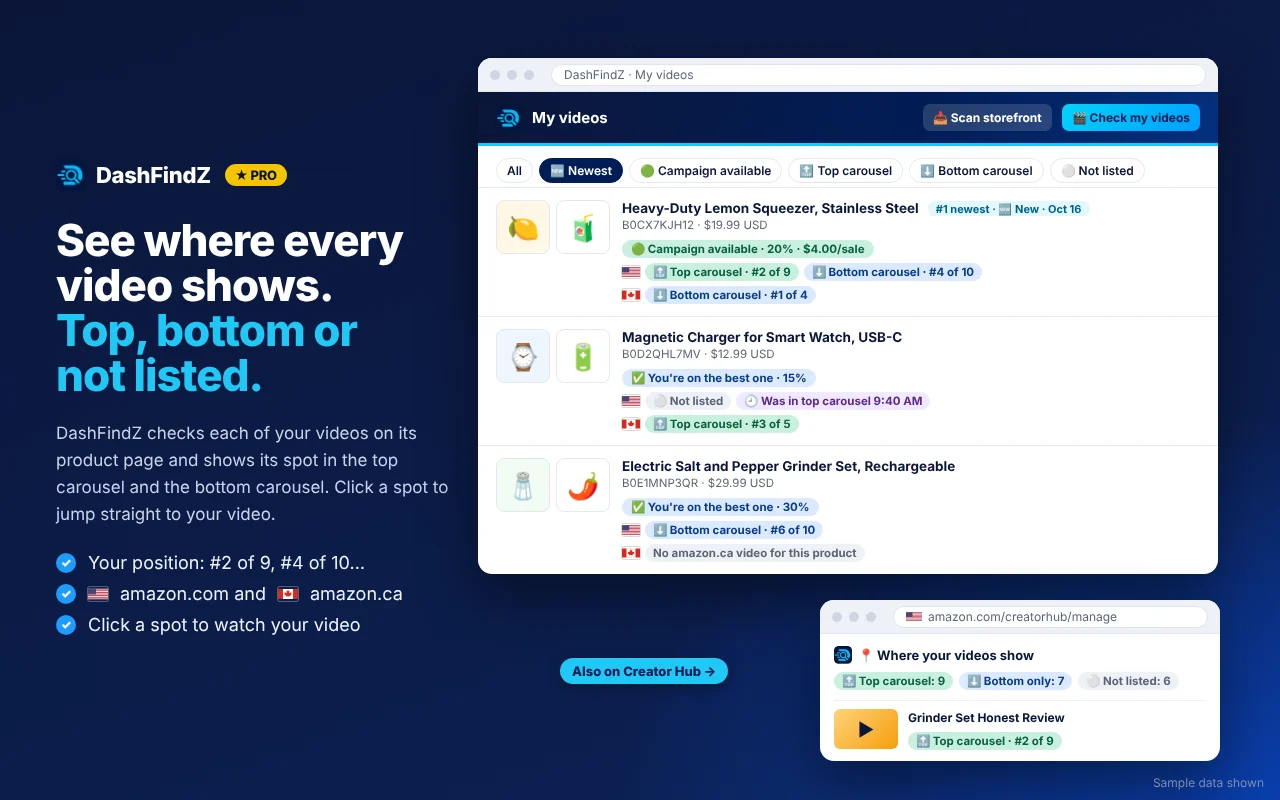
What you see for each video
- 📍 Top carousel, bottom carousel or not listed, for every product the video is tagged on.
- Your exact position, like #2 of 9.
- 🇺🇸 amazon.com and 🇨🇦 amazon.ca side by side, since the same video can sit in different spots on each store.
- One click opens the product page with your video playing, so you can see it the way shoppers do.
Shown everywhere you look at your videos
Placement shows up on your DashFindZ My videos page, on Creator Hub's Manage videos page, on amazon.ca's My content page, and on your US and Canadian storefronts. Use the 🆕 Newest filter to check your latest uploads, or the "Only on amazon.ca" list to find videos you haven't posted on amazon.com.
Earn more from videos you already made
DashFindZ also checks your existing videos for Creator Connections campaigns on the same products. A video you posted months ago might qualify for extra commission today.
Read the guide: Top carousel vs bottom carousel →
Questions
What's the difference between the top and bottom carousel?
The top carousel is the row of videos near the product photos at the top of an Amazon product page. The bottom carousel is the video section further down. The top spot is seen by many more shoppers.
Does DashFindZ move my video to the top carousel?
No. Amazon decides where videos show. DashFindZ tells you where each video is right now, so you know which ones are working and where to focus.
Does it check amazon.ca too?
Yes. DashFindZ checks your videos on amazon.com and amazon.ca and shows both side by side.
Is this in the free version?
Where your videos show is part of DashFindZ Pro. The free version shows top and bottom carousel video counts for any product.
More from DashFindZ
Product score & badges
A score out of 100 on every Amazon product, plus badges on search, deals and best sellers.
Read more →PROCreator Connections tools
Days left, spots left and $ per sale on every campaign, plus alerts and brand messaging.
Read more →GUIDEHow to pick Amazon products to film
A simple 5-question checklist before you buy or film anything.
Read more →Start finding better products today
Free to install. Works on amazon.com and amazon.ca.
Add to Chrome, it's free